
pclshm / playground · features · 0.1.0
Every feature, described. With the panel and the command that does it.
Sixteen areas over one headless core. Each one below names where it lives in the window, what pg command does the same from a terminal, what it does for you, and — in the repository's own words — why it is shaped the way it is. Nothing here is a roadmap: a thing that is declared but not yet available says so, and a thing that only exists on the command line is not described as a button.
- 01Local models
- 02The gateway
- 03Coding agents as runtimes
- 04Plans, standing agents, the fleet
- 05Tools, policy, approvals, audit
- 06Runs
- 07Projects, assets, lineage
- 08The workspace
- 09The workshop
- 10The tracker and the vault
- 11Retrieval
- 12Generation and the DCC bridges
- 13The brain
- 14The companion, the voice, the pad
- 15The dashboard
- 16Skills, memory, themes, terminal, settings
01 Local models
The llama.cpp workbench.
Point the app at your GGUF folders and it does the rest: scan and register, estimate whether a model will fit, launch a server, watch it, benchmark it, stop it.
The scan is recursive, groups split GGUFs, and digests every file with BLAKE3 so a model moved between folders is still the same model. Before a launch, a feasibility check estimates the VRAM the model and its context will take — because an over-budget load on a consumer Windows driver often does not fail: it spills to system RAM and decode collapses. The check is the guard, not the exit code.
A launch starts a llama-server, in Docker by default or as the native binary you already have installed, and the Instances view shows it live: time to first token, prefill and decode tokens per second, inter-token latency percentiles, KV and slot occupancy, VRAM. Inference profiles are the server's knobs rendered from the generated schema, where the help text is the Rust doc comment. A benchmark sweeps a profile matrix over a fixed prompt set and compares the cells in one table. Chat with a reasoning model and its thinking streams on a separate channel into a collapsible view and the persisted trace.
- Split GGUFs grouped; models in several folders; digests, not paths, as identity.
- Telemetry from the server itself and from the GPU driver, attributed per instance.
- Docker is optional:
just upreports what it skipped rather than failing.
02 The gateway
An alias goes in; a routed, budgeted, accounted, recorded turn comes out.
One way to reach a model, whichever kind of connection is behind it — and an OpenAI-compatible endpoint anything on your machine can point at.
A hosted provider is a JSON manifest naming an adapter family — openai-compat or anthropic-messages — so adding one needs no rebuild. OpenAI, Anthropic, DeepSeek and xAI ship as manifests; LM Studio, Ollama, a hand-started llama-server or a box on the LAN are one pg providers add --base-url away. Keys go to the OS keychain and are referenced by name; they are never printed, never stored in a config document, never logged.
Every request carries an alias. The gateway resolves it against a routing table, checks the budget before the call, records the spend after it, and writes the whole exchange into the run. Fallback is never implicit: it happens only when a configured rule matches, and the run says what it fell back from, to, and why. pg gateway serve exposes the same surface as an OpenAI-compatible HTTP endpoint, so a tool that speaks that wire — an editor plugin, a script, a framework — reaches your routed, budgeted models and shows up in the same ledger.
- A provider a project has not opted into is refused with the reason, per project.
- A model that cannot be picked says why. It is never hidden from the picker.
- Pi (Inflection) is declared and not available: badged, never routable.
03 Coding agents as runtimes
The agents you already have, on the models this app routes.
Claude Code, Codex, Gemini, Grok, opencode and Pi, and LangGraph, CrewAI and Pydantic AI in containers, are interchangeable runtimes. Each passes the same conformance suite; each declares what it can and cannot do rather than faking it.
Every coding agent has a documented non-interactive mode that prints structured events, and the runtime SDK reads it. The model endpoint was the hard part: Claude Code expects the Anthropic Messages wire and Codex the Responses wire, and this gateway speaks chat completions. So a translator runs in the sidecar, for one run, and dies with it — a loopback server holding that run's grant, gated by a token minted for that run. The side effect is the interesting part: Claude Code against a local GGUF, with every token in the run's ledger.
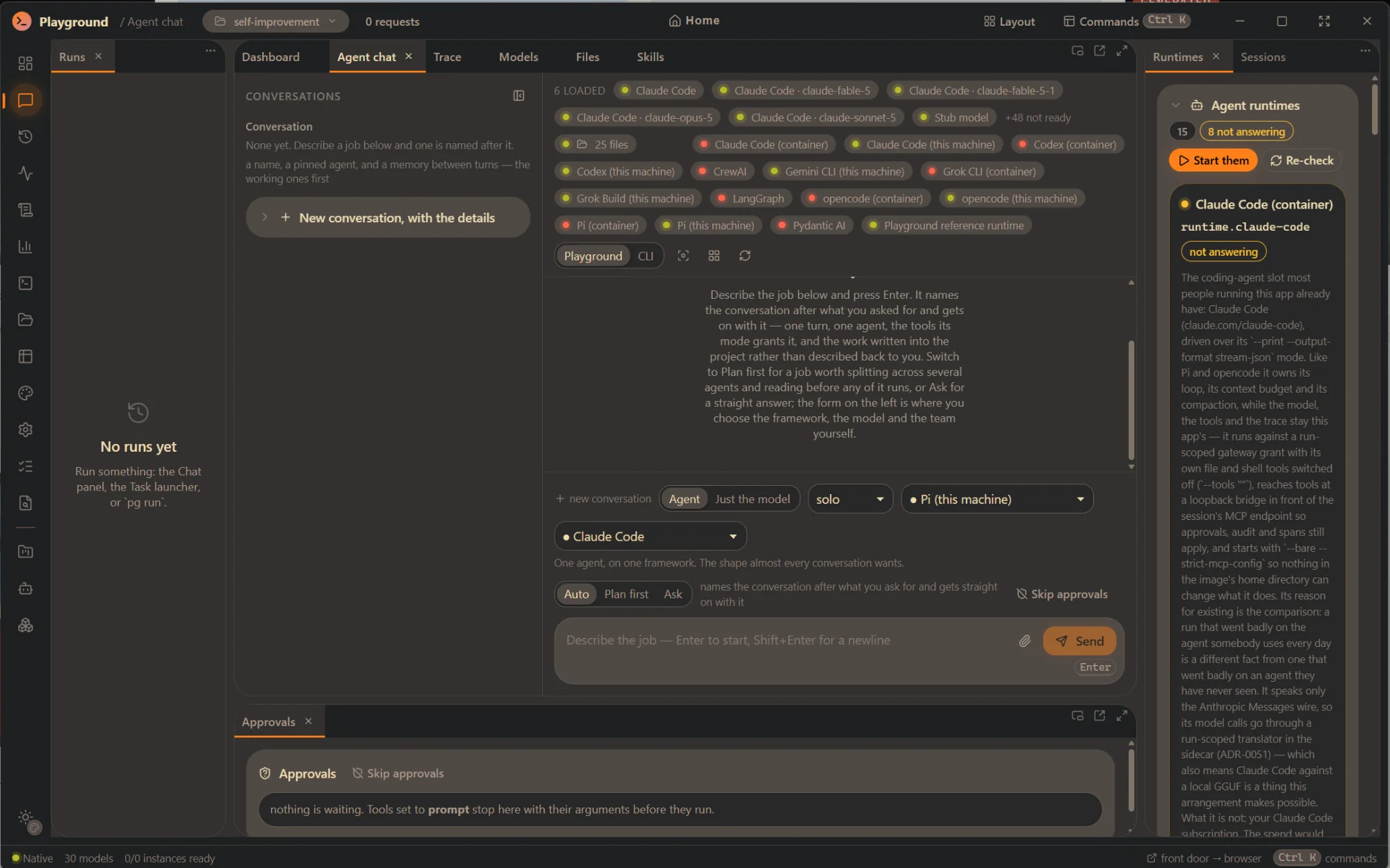
A conversation has three shapes. Ask for a straight answer. Auto, the default: one turn, one agent, the tools its mode already grants it, and a preamble that says do it now and leave it where it can be found. Plan first for a job worth splitting across agents and reading before any of it runs. The team, the model and the thinking ceilings can all be changed while the conversation is open. A Playground | CLI switch draws a turn either as this app's fold or as the agent's own terminal would have — and on Claude Code (this machine), the turn runs in Claude Code's own terminal and that view is it, spinner, permission prompts and your keystrokes included.
- A tool call a model writes as text instead of on the tool channel is read in one place, under the same policy and audit — and the run says the model did that.
- A stopped runtime is shown with its reason and the command that starts it. Never hidden.
- As a chat target under your own subscription, the CLI provider says in its manifest that the cost is unknown.
04 Plans, standing agents, the fleet
A plan a person approves is what authorizes autonomous work.
Scope a conversation into a plan with its own questions, approve it once, and it runs itself out with nobody typing.
The orchestrator hands out every ready step, ends its turn, and is woken by each worker coming back — idle between workers by design, which is what lets a conversation survive the window being closed. Delegation refuses without an approved plan, and that is checked in the tool, not asked for in a prompt. Standing agents run on interval or cron heartbeats, can be paused, resumed and sent instructions while they sleep, and every firing is journalled — including the ones that were skipped, and why.
The fleet is everything working right now as a tree: agents, the agents they delegated to, every background task, each with the last thing it said. The Activity panel is the same tree in the window; the dashboard is the same tree as a picture.
05 Tools, policy, approvals, audit
Any MCP server is configuration. A tool that runs a program can never be automatic.
An MCP server is a command or a URL, never code. Its tools join one namespaced surface beside the app's own — each carrying its feature group, its effect, and the command a person would type for the same thing.
Policy per tool is auto, prompt or deny, under a shipped floor no user policy can lower: anything that executes code always asks. That is by declaration at the tool's definition site, not by a setting somebody could edit. An approval shows the arguments a call was made with — for a script an agent wrote a minute earlier it shows you the script, not the filename — and every decision is in the run's audit, readable afterwards. An agent that needs a tool that does not exist files a request with tool_suggest instead of working around the app; the queue lives with the servers.
Playground ships its own MCP server, so an agent can use the app: read a run, search the library, write into a memory table, schedule a routine, pin a card — every write through the same gate as any other tool.
- Transports: stdio and streamable HTTP. Namespacing:
{source}.{tool}. - Skip approvals is a button at the composer, a property of the running window, off on every launch.
- A host-run DCC server's read-only tools still stop at a prompt. No policy turns that off.
06 Runs
Inspect, replay, fork, compare.
Every unit of work — a chat turn, a retrieval query, a multi-agent session, an image, a spoken sentence — is a run with typed input, a config snapshot, an event stream, outputs and metrics.
The trace viewer is virtualized, so a 100,000-event trace still scrolls. The tool trio prints the arguments a call was made with, who decided it, and what came back. A gap where the run went quiet is drawn as a gap, because stacked without timings a stall is indistinguishable from a busy run. Copy trace renders the same fold as pasteable text with a ~~~ 3m55s gap ~~~ line wherever the run waited.
Replay means identical input, so it refuses an override. Fork is the edit path: one parameter changed, everything else identical, the lineage kept. Compare puts runtimes, models or configurations on one task side by side. A new task kind appears in the list, the launcher form and the trace with zero UI edits, because the form comes from its schema and the trace from its events.
07 Projects, assets, lineage
A project is a folder. The app's index is a cache; the folder is the truth.
Point the app at a folder you already have. It is attached if it carries a project file, adopted if it does not — with Playground's own files kept in .playground/ inside it and one line added to .git/info/exclude, never to your committed .gitignore.
Everything produced is a content-addressed, deduplicated, tagged asset carrying the run that made it, searchable by name, tag, model, provider, run, date or free text at ten-thousand-plus scale. The lineage is a graph: a mesh made from a generated image is a real edge, and every node offers “regenerate with the same config” and “fork config”. Per-project settings include which external providers this project may use — enforced through a port, so a refusal says why.
Export a bundle, wipe the app's data, import it back, and nothing is lost. Copy a project folder anywhere, attach it, and the library is back. A project whose folder is missing is listed with the reason, never dropped.
- Previews read headers, not payloads. There are no thumbnails; a preview is what the file says about itself.
- Asset kinds are a link-time registry; a new kind is a folder and one line in the leaf binary.
08 The workspace
Files an agent and a person edit together.
The mutable half of a project: ordinary files at ordinary paths that you and the agents hold at once, with an append-only change journal that records who wrote what.
A folder watcher feeds the same journal, so an edit you make in your own editor is attributed too. You and an agent read that journal through the same cursor — one record, two readers, no second notification path that could disagree. An agent can rewrite a file while you are typing in it: the panel keeps your draft, marks the file stale on disk, and offers the two honest choices. It never swaps the text under your cursor.
Every command run in a tree is saved with the folder, the environment and a sentence saying what it is for, so the command library fills itself from ordinary work. Starting a dev server is a second verb that follows its output and links the first URL it prints. Each run that works gets its own tree, so two runs scaffolding at once cannot write over each other.
09 The workshop
A run works on a branch, in a worktree. The branch is the deliverable.
A project holds repositories — attach a checkout you already have, or clone a remote — and the git verbs are typed operations rather than shell strings.
None of them forces. Pull is fast-forward only. Push refuses the trunk unless a person says so. A run working on a repository gets its own worktree on a branch derived from its run id — one object store, N checkouts, no second clone — and clearing the run prunes the tree while keeping the branch. Opening a pull request is publishing: declared at the tool's definition site, floored at a prompt, and no policy can loosen it. Everything other people wrote — an issue, a review, a comment — arrives as untrusted text with a marker, and nothing is filtered.
10 The tracker and the vault
An epic, a feature, a ticket — each a document in the project.
A work item is a markdown file in the project's work/ folder with front matter: kind, state, parent, spec reference, links, provenance. Open it in your editor if you like; it travels with the branch and diffs in review.
A deliberately small state machine — proposed, ready, in progress, in review, done, plus blocked and dropped — refuses an illegal move by listing the legal ones. A claim protocol lets a standing session take the next ready ticket without anybody assigning it. Every change names the run that made it; a stale update is refused, never merged silently. The same board runs over GitHub issues and pull requests through the second tracker adapter.
The vault: a declared folder outside the project — somebody's notes — gets the same journal and watcher the workspace has, staying readable and never writable. An extraction run reads what moved, decides what is actionable (an unticked checkbox, a TODO, a configured tag, a front-matter status) and writes proposals that quote the line they came from. Nothing files itself. Specifications: an intent.md beside the code it changes is read as data, and its “Done when” checklist is a list of claims a run is held to.
11 Retrieval
Retrieval you can take apart.
A pipeline is eight slots — source, parse, chunk, embed, index, retrieve, rerank, compose — each a registered stage with its own generated config form.
Sources are files, folders with a watch, URLs and repositories. The inspector shows every chunk, its per-leg scores, the assembled context and the token budget. The app computes which edits invalidate the index and which only change how a question is answered, and marks them apart, so “tweak and see” never silently becomes “wait ten minutes”. An eval loop scores saved query sets across pipeline versions — recall, MRR, nDCG — so you measure instead of arguing.
The chunk ledger is the record and the vector store is a derived index: swap the embedded store for Qdrant and the app re-upserts from the ledger at zero embedding calls. A fresh pipeline embeds with the deterministic stub that ships, so a first run works with nothing installed — it ranks; it does not understand.
- Parses text, markdown, code and HTML. PDF, office documents and image captioning are not parsed; each is a stage someone can add.
- Stores: vec-embedded (SQLite in the project folder, dense plus FTS5 lexical) and vec-qdrant. One contract suite for both.
12 Generation and the DCC bridges
Every result a tracked asset, with the run that made it.
Images, video and meshes from hosted or local generators. A generator hands back bytes and can reach nothing else; core puts them through the single ingestion door with the producing run attached.
Higgsfield's hosted queue, a local ComfyUI workflow service, local Hunyuan3D 2.1 image-to-mesh in shape or textured form, and the deterministic stub that needs no key, no GPU and no container. Pick a generator, fill in its model's own form, watch the job. A provider that reports no percentage gets no progress bar — an invented one reads as knowledge. Regenerating with a modified seed is a fork of the original run. TRELLIS2 is declared and not available: badged, refused, never routable.
Three shipped MCP bridges reach the tools a game is actually made in. Godot: project and scene operations, launching the editor, running a project, capturing debug output, and a paired runtime bridge that plays it and can capture a viewport. Blender: the agent writes a Python script, Blender runs it, and the script stays the source of truth as a tracked asset. Aseprite: sprites, layers, frames, tags, palettes and sprite-sheet export. They ship off and scoped to nothing; a repaint made outside the app shows as a diverged link and a sync takes the new bytes in as revisions.
13 The brain
One full-screen front door over all of it.
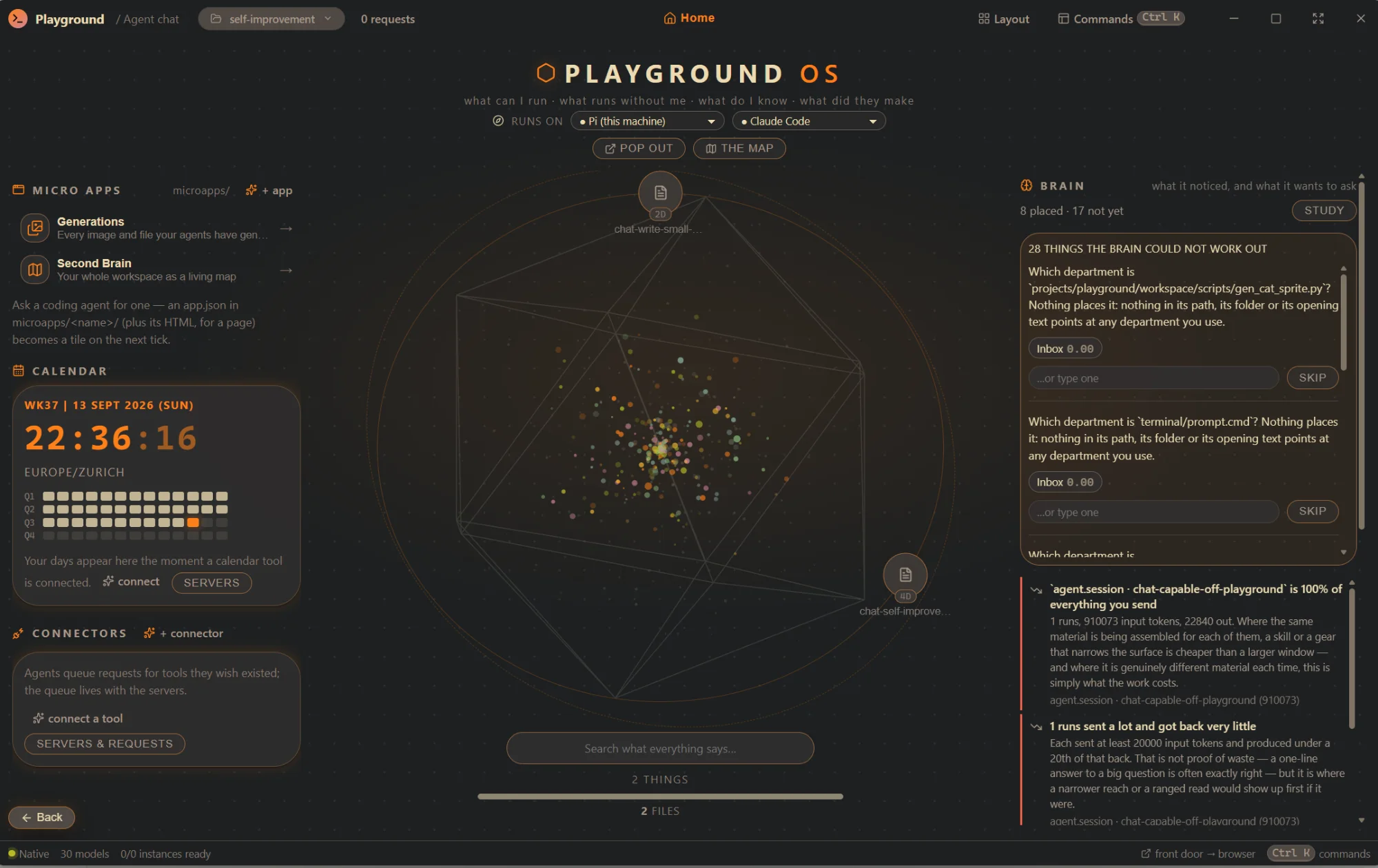
What can I run, what runs without me, what do I know, what did they make. The front door opens on a fresh profile and is one key away from anywhere.
In the centre, the wheel of every artifact your agents actually finished — generated assets and agent-written files, held back while a run is still going, so a half-written report is progress rather than a thing your agent made. Around it: the deck of skills that fire from a button, the routines board whose Fire goes through the real scheduler, declared Calendar and Email widgets that fill the moment an MCP server serving the group is connected, connectors, and micro-apps a coding agent writes on the fly as files in the workspace — a page app runs sandboxed on its own origin. Every “+” is a send-off: it opens a conversation whose first turn is the job.
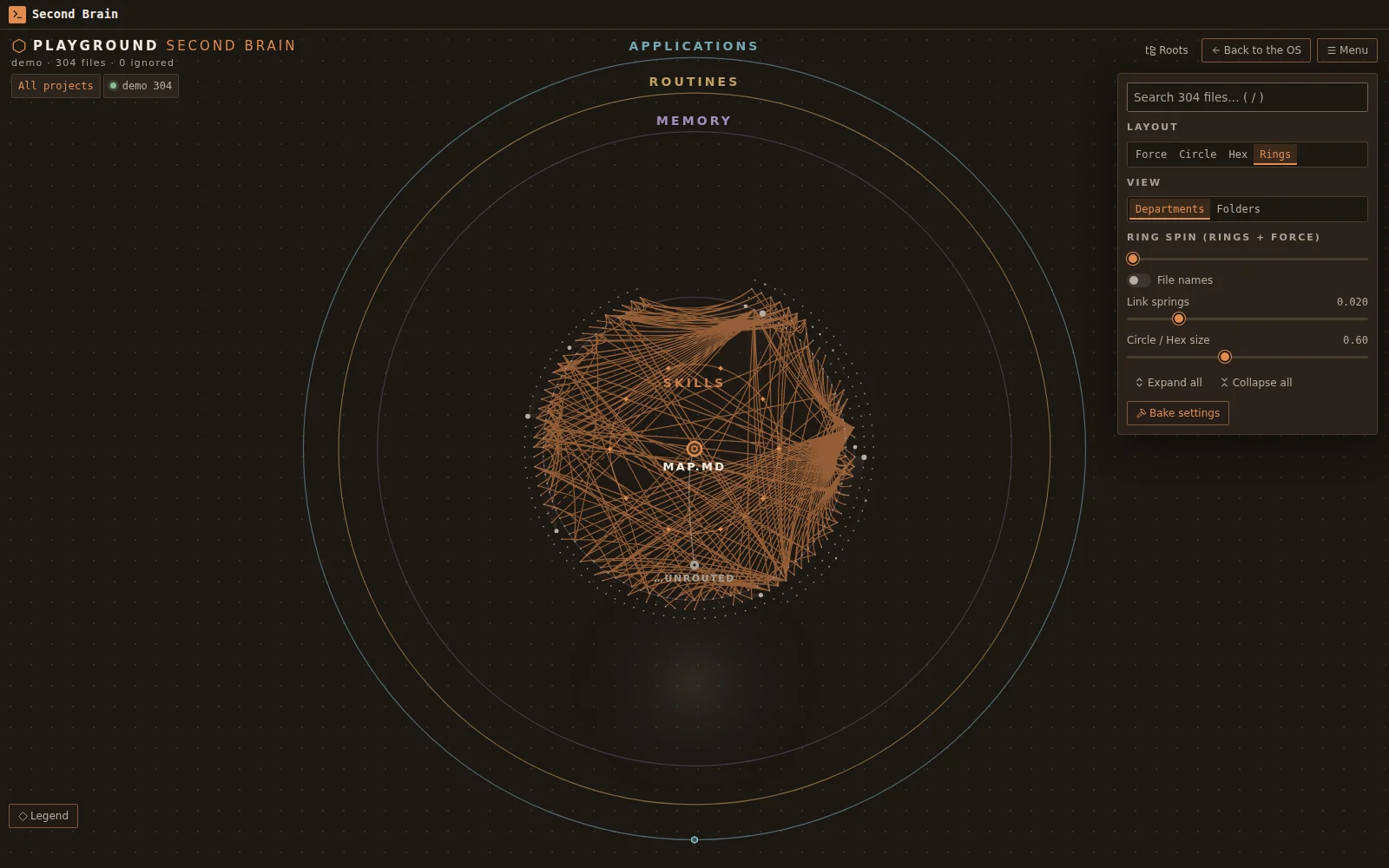
The Second Brain draws every project's files, whole, as rings on a hand-owned canvas — sixty thousand nodes, search-as-you-type flying you to the hit. The study run places each file in a department, marks who decided and why, and asks in a question queue on the door when it is not confident, because a prompt that interrupts is a prompt people dismiss. A wheel entry opens in a viewer that draws the thing the way it wants to be read: Markdown as a page, HTML sandboxed as itself, code as code, an image or a PDF as itself. The door shows; the workbench edits.
The whole surface is reachable from a browser with pg brain serve, on loopback only, behind a token minted on demand and revocable while the server runs. A browser can start work it cannot approve — there is no approval UI in a browser, ever. The same command runs the app as a node on a VM or a mini PC, reached through a tunnel from any other install.
14 The companion, the voice, the pad
A small window you pin in a corner and talk to.
From inside any other application, with a global chord: hold the key, say what you want, and it becomes a turn on a conversation or a card on the board any agent can claim.
A spoken turn is a run, so what it heard is in the trace, which provider heard it is pinned in the snapshot, and a sentence heard wrong is a fork away from being said again. Routing refuses rather than guesses: a closed list of filing phrases, or the conversation you named, or nothing — with the words kept and both fixes in the sentence. The voice is a port: speech-openai is the wire, not the vendor, so OpenAI, Groq, or a whisper server on this machine is a config document; the browser's own recogniser is a second path that on most platforms never leaves the machine.
Under the microphone is a four-column board and who is working right now. On your desk, a macropad whose lights are a projection of the fleet — working, waiting on you and blinking, stuck, failed — driven by a profile that is data rather than a driver, over the Linux hidraw node or a helper process you supply. One component, four homes: a dock panel, a full-screen surface, its own pinned window, and a page served to a phone.
15 The dashboard
One window that says what everything is doing, from outside the workbench.
Working, waiting, approvals, stuck — then servers, models, services and the day's spend. Every counter that leads somewhere is a link.
Between the counters and the feed is a picture of the app's own graph: conversations orbit the core, their agents orbit those, a delegated worker sits outside the agent that dispatched it, and the substrate — every MCP server, loaded model and dev server — sits on the rim. Structural pipes are always drawn; traffic pipes light when something actually goes through them and fade over six seconds, so a green dot with every pipe dark is a stall you can see from across the room. The feed is one row per thing happening, ordered by what you would deal with first; a tool call waiting on a yes is always the top row.
Pop it out and it is a window: frameless, pinnable above every other application, resizable down to a desktop widget, removable from the taskbar. Clicking anything raises the workbench and lands you where the thing is. It costs two poll tiers and nothing at all while hidden.
16 Skills, memory, themes, terminal, settings
The supporting surfaces.
Each one small, each one honest about what it is.
Skills are the procedures an agent looks up mid-job instead of being told on every turn, edited as data, with a master switch and a “have an agent write one” path. Imported skill sources arrive switched off until a person enables or trusts them; the description is the whole of what an agent sees before it decides.
Memory tables are an agent's notebook you can read and seed by hand, every row linked back to the run that wrote it.
Themes are fifteen colours with three ways in — paste a VS Code, Windows Terminal, Alacritty or base16 palette; describe it offline; describe it to a local model — all ending in contrast repair that says what had to move. The family's own Instrument Dark and Paper Light ship as the defaults; every earlier theme stays selectable. The Theme editor is where they are made.
The terminal is a real PTY wearing the theme. It sources your own shell configuration first and replaces only the prompt; red stays red.
Every settings form is generated from the JSON Schemas, so a new setting is a Rust field plus a codegen run. Nobody hand-builds a settings form here.
17 Get it
Free, MIT, unsigned, yours.
Three installers built from one tag, with pg beside the app. The download page says what your operating system will ask you, and links the checksums.