pclshm / playground · 0.1.0 · Windows · macOS · Linux · MIT

The daily AI workspace. Everything it does is a run you can read.

Local models, hosted APIs and the coding agents you already have, on one permanent base — with projects, tools, retrieval and generated assets beside them. Every unit of work, from a chat turn to a spoken sentence, keeps its typed input, a config snapshot, an event stream, outputs and metrics. Inspectable, replayable, forkable, comparable.

Download Every feature, described

One person's tool, built in the open. It is 0.1.0 and the builds are unsigned. It runs entirely on your machine and reaches a network only for a provider you configure, never at start.

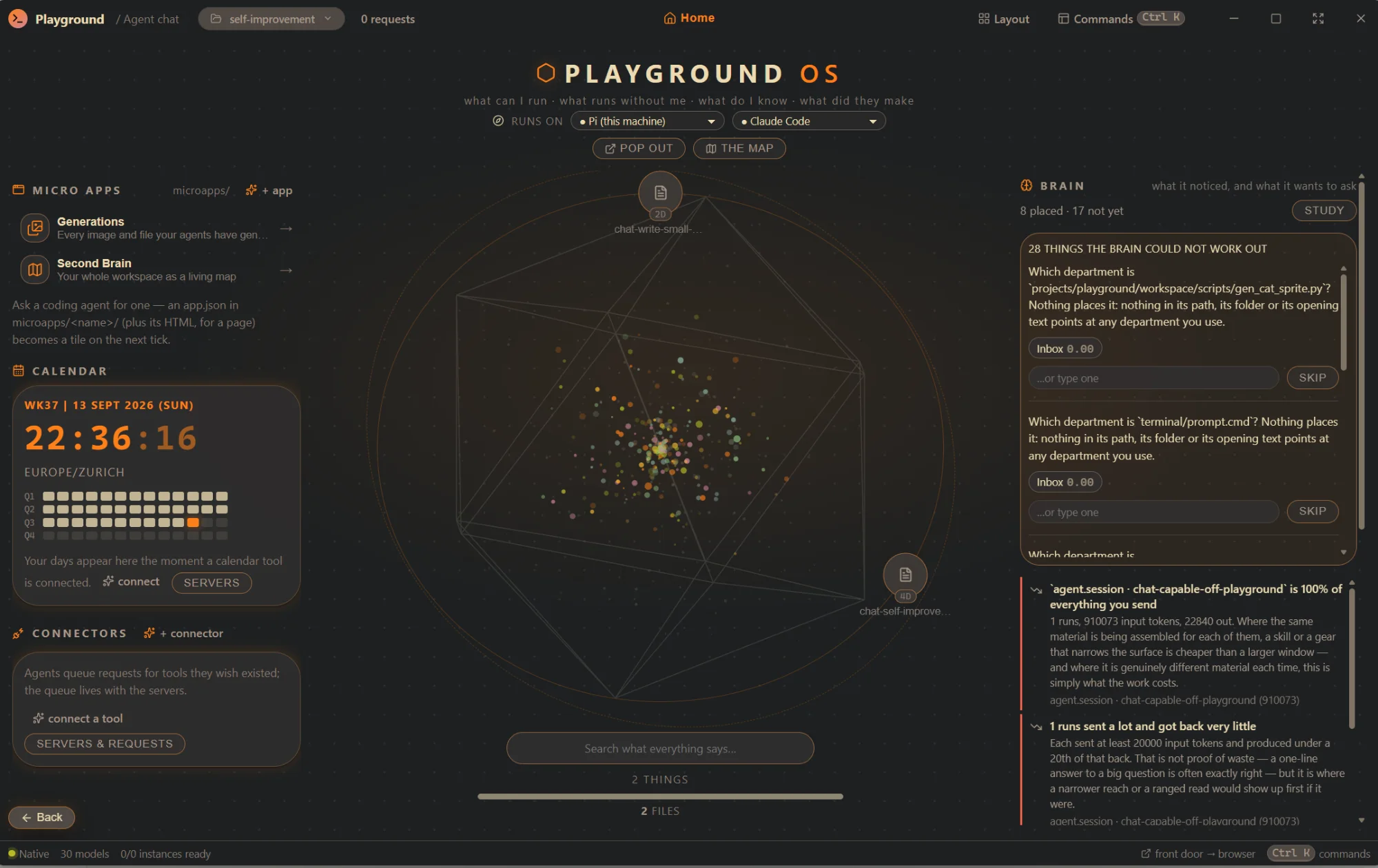
Playground's front door: a wheel of every artifact in the centre, micro-apps, the calendar and connectors on the left, and the brain's questions and notes on the right
The front door — what can I run, what runs without me, what do I know, what did they make. screenshot · 0.1.0 · Windows

01 The idea

Three rules hold the whole thing together.

They are the same rules the repository is measured against, and the machine enforces two of them. The third is a habit the app refuses to break.

Everything is a run.

Any unit of work produces a run with typed input, a config snapshot, an event stream, outputs and metrics. Replay it from the same snapshot. Fork it with one parameter changed and the lineage kept. Compare runtimes, models or configurations on one task, side by side.

“A sentence heard wrong is a fork away from being said again.”

Fail visibly.

No silent fallback between providers, no swallowed error, no default that hides a missing choice. A fallback happens only when a configured rule matches, and it says what it fell back from, to, and why.

“An unavailable model is listed with the reason, never hidden. A model that vanishes from a picker is a bug report.”

Local-first, in the open.

A project is a folder you already have; the app's index is a cache and the folder is the truth. Keys live in the OS keychain, referenced by name. Nothing leaves the machine unless you point it at a provider, and every token that does lands in a ledger.

“Copy a project folder anywhere, attach it, and the library is back.”

02 What's inside

One base. A new capability is an extension, not a rewrite.

Sixteen areas, each a slice over the same headless core. Every panel here has a pg command that does the same thing from a terminal, because the window is a second, thin consumer of the same services — never the other way around. The long version, with every panel and command named →

  1. 01

    Local modelsModels · Library / Instances / Profiles / Chat · pg models, pg bench

    Point it at your GGUF folders. It scans, estimates whether a model fits in VRAM before you launch it, runs llama-server, shows live telemetry, benchmarks a profile matrix and lets you chat — reasoning streamed on its own channel.

    Read →
  2. 02

    The gatewayModels · Providers · pg gateway, pg providers, pg creds

    An alias goes in; a routed, budgeted, accounted, recorded turn comes out. Hosted providers are manifests, not code. An OpenAI-compatible endpoint anything can point at, with every request in the same spend ledger.

    Read →
  3. 03

    Coding agents as runtimesAgent chat · Agent grid · Runtimes · Sessions · pg agent, pg agents

    Claude Code, Codex, Gemini, Grok, opencode and Pi, plus LangGraph, CrewAI and Pydantic AI in containers — interchangeable runtimes on the models this app routes, each passing the same conformance suite.

    Read →
  4. 04

    Plans, standing agents, the fleetthe plan card · Activity · Sessions · pg plan, pg sessions, pg fleet

    Scope a conversation into a plan, approve it once, and it runs itself out with nobody typing. Standing agents on heartbeats. Delegation authorized by the plan a person approved, checked in the tool.

    Read →
  5. 05

    Tools, policy, approvals, auditMCP · Tools · Approvals · pg mcp, pg tools

    Any MCP server is configuration. One namespaced surface beside the app's own tools, a policy floor no user setting can lower, approvals that show the arguments, and an audit you can read afterwards.

    Read →
  6. 06

    Runs: inspect, replay, fork, compareRuns · Activity · Trace · Bench · Launcher · pg run, pg runs

    A virtualized trace that still scrolls at 100k events, the tool trio of arguments, decision and result, gaps marked where a run went quiet, and a copy that pastes as text.

    Read →
  7. 07

    Projects, assets, lineageProjects · Library · Inspector · Lineage · pg projects, pg assets

    A project is a folder you already have. Everything produced is a content-addressed asset with the run that made it, searchable at scale, on a lineage graph that offers “regenerate” and “fork config”. Export a bundle; nothing is lost.

    Read →
  8. 08

    The workspaceFiles · pg files, pg format

    Ordinary files at ordinary paths that you and the agents hold at once, with a change journal that says who wrote what — your editor's edits included. Commands and dev servers saved with the folder.

    Read →
  9. 09

    The workshopthe scope switcher · the work board · pg repos, pg work propose

    Repositories attached or cloned, typed git verbs that never force, a worktree per run on a branch named after it, and a pull request treated as publishing — floored at a prompt.

    Read →
  10. 10

    The tracker and the vaultWork board · Specs · pg work, pg notes, pg spec

    An epic, a feature, a ticket — each a markdown document in the project. A claim protocol so a standing session picks up the next ready ticket. A notes vault read, never written, into proposals that quote their line.

    Read →
  11. 11

    Retrieval you can take apartCollections · Pipeline · Inspector · Eval · pg rag

    Eight stages, each a registered plugin with its own form. An inspector for every chunk and score. An eval loop across pipeline versions. Swap the vector store at zero embedding calls.

    Read →
  12. 12

    Generation and the DCC bridgesGenerate · Lineage · MCP · pg gen, pg mcp enable godot|blender|aseprite

    Images, video and meshes from hosted or local generators, every result a tracked asset. Bridges into Godot, Blender and Aseprite that ship off, scoped to nothing, and stop at an approval showing the arguments.

    Read →
  13. 13

    The brainthe front door · Second Brain · pg brain, pg map

    One full-screen surface over all of it: the wheel of everything your agents finished, the deck, the routines board, micro-apps, and a map of every project's files that asks when it is not sure.

    Read →
  14. 14

    The companion, the voice, the padCompanion · pg control

    A small window you pin in a corner and talk to from inside any other application. A spoken turn is a run. A macropad on your desk shows the fleet in light.

    Read →
  15. 15

    The dashboardDashboard · the pop-out window · Playground --hud

    Working, waiting, approvals, stuck. A picture of the app's own graph where traffic lights the pipes and fades over six seconds, so a stall is visible from across the room.

    Read →
  16. 16

    Skills, memory, themes, terminal, settingsSkill Library · Memory · Theme editor · Terminal · Settings

    Procedures an agent looks up mid-job, edited as data. An agent's notebook you can read. Themes with contrast repair that says what moved. A real shell wearing the theme. Every settings form generated from a schema.

    Read →

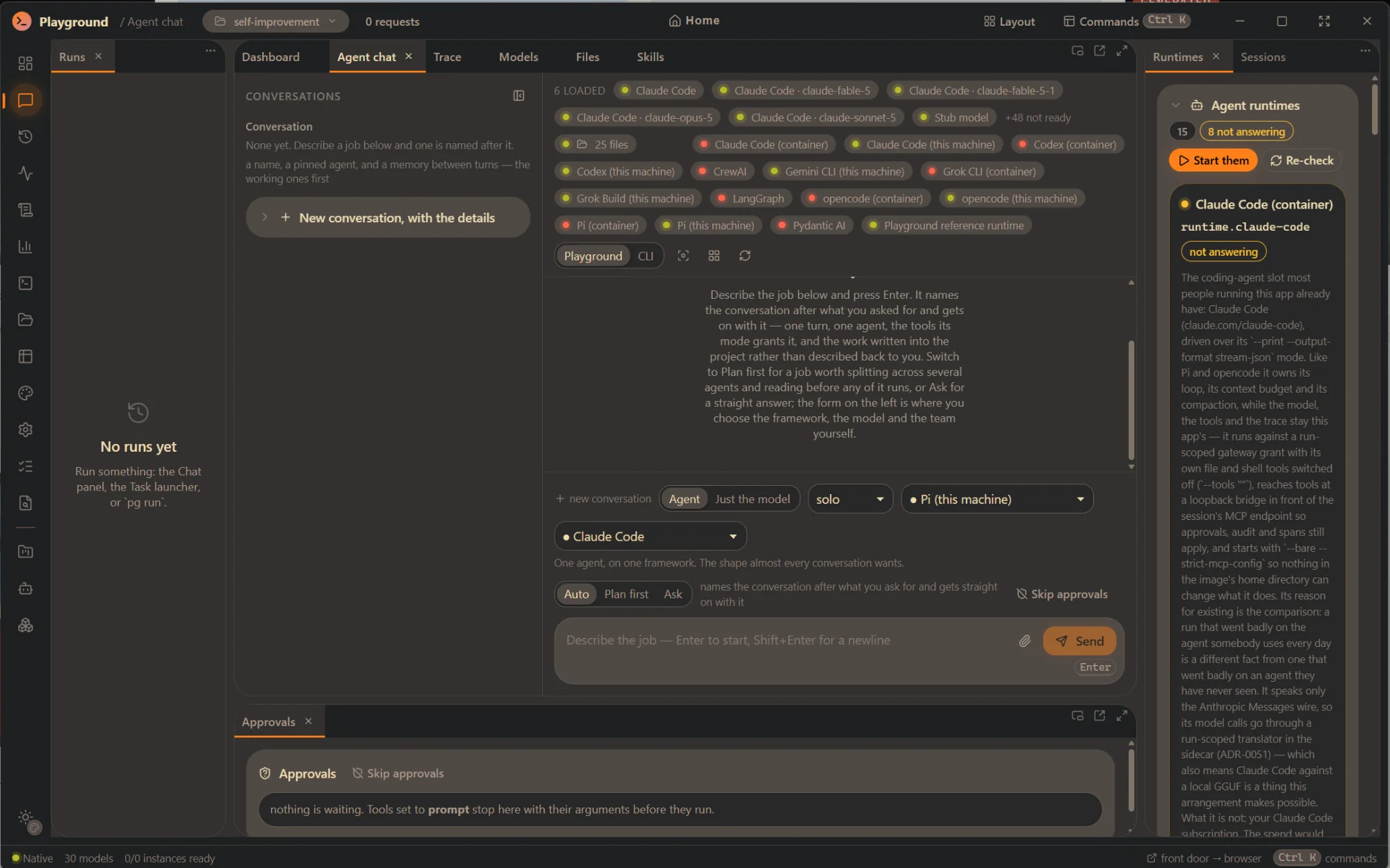
The Agent chat panel: a conversation composer with Agent or Just-the-model, a framework picker, Auto / Plan first / Ask, the loaded models and runtimes above, and the Runtimes panel beside it
Agent chat — one agent, on one framework, on the model you chose. screenshot · 0.1.0
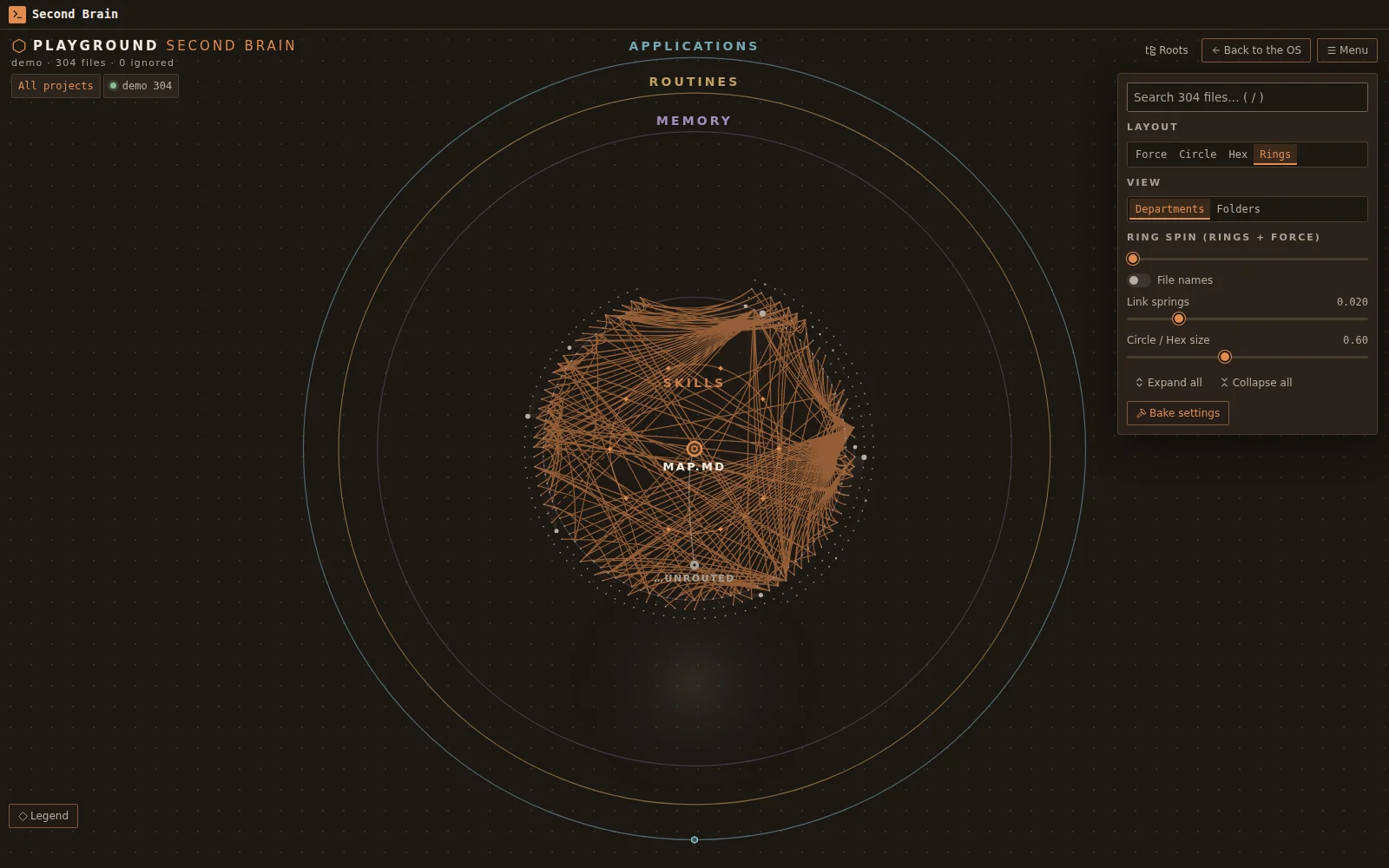
The Second Brain: every file of the workspace drawn as rings around the router file, with departments, skills, the memory band and routines
The Second Brain — every project's files, whole, on one canvas. screenshot · 0.1.0 · served to a browser

03 The agents you already have

Three kinds of connection. Never one “provider”.

A conversation always says which of the three it is running on, because they are not interchangeable: a CLI subscription does not grant API access, a hosted key is metered per token, and a local model has a different capability envelope. The badge is mandatory. The app never guesses which one you meant.

Installed CLI

Your coding agents, as runtimes

The agent CLIs installed on this machine, driven in their own non-interactive mode against a run-scoped gateway grant — so they run on whatever the alias routes to, a local GGUF included, and every token lands in the run's ledger. Or, as a chat target under your own subscription, with the cost honestly unknown.

  • Claude Code · this machine or a container
  • Codex · Grok CLI · opencode · Pi · Gemini CLI
  • LangGraph · CrewAI · Pydantic AI (containers)
  • the reference runtime · the orchestrator
Hosted API

Your key, billed per token

A provider is a JSON manifest naming an adapter family. The key goes to the OS keychain and is referenced by name. Budgets are enforced before the call; spend is recorded after it; a fallback happens only when a rule says so, and says so.

  • OpenAI · Anthropic · DeepSeek · xAI
  • any OpenAI-compatible endpoint: LM Studio, Ollama, a llama-server, a box on the LAN
  • families: openai-compat · anthropic-messages
Local model

On this machine, no key, no network

GGUF files in folders you name, served by llama.cpp in Docker or by the native llama-server you already have. A feasibility check before the launch, because an over-budget load on a consumer driver does not fail — it spills to system RAM and decode collapses.

  • scan · feasibility · launch · telemetry · bench
  • inference profiles from the generated schema
  • reasoning streamed on its own channel

04 From a terminal

Everything the app can do, from pg.

Every installer puts the pg command beside the app. It drives the same services the window drives, it is the surface the integration tests run against, and if something only works in the window, that is a bug. Serve the front door to a browser on loopback with pg brain serve, behind a token minted on demand and revocable while the server runs.

pg — the same app, from a terminalsh
$ pg setup --home D:\Playground
home pinned — every run lands under it
$ pg models scan
3 GGUF models · VRAM estimated · profiles ready
$ pg run chat:local --set seed=1
run 01J9…K4 · 41 tok/s · TTFT 180 ms
$ pg agents compare --message "What is a config snapshot for?"
4 runtimes · one task · diffed side by side
$ pg runs fork 01J9…K4 --set temperature=0.2
$ pg sessions do research "summarise what changed this week"
$ pg brain serve
http://127.0.0.1:7317/?token=…  — printed once

05 Download

Three installers, one build.

Every package is built from the same tag by the release workflow, under the hardened release profile, and carries pg beside the app. Checksums are in SHA256SUMS on the release. The builds are unsigned: each card says what your operating system will ask you.

Windows

  • Looking up the latest release…

SmartScreen says Windows protected your PC — More info, then Run anyway. The wizard asks where the app goes, which shortcuts to create, whether to put pg on PATH, and where your data lives. Unattended: /S /HOME=D:\Playground.

macOS

  • Looking up the latest release…

Unsigned and not notarised: drag Playground to Applications, then right-click → Open the first time. Apple silicon. pg is inside the bundle at Contents/MacOS/pg.

Linux

  • Looking up the latest release…

sudo apt install ./Playground_*.deb or sudo dnf install ./Playground-*.rpm — both put pg in /usr/bin and register the launcher entry with its Dashboard action. The AppImage needs chmod +x and nothing else.

06 The setup

It asks what matters, and nothing else.

The Windows wizard is drawn with the app's own palette and set in the system font. Beyond the usual — where the program goes, this user or every user — it has two pages of its own, and the uninstaller undoes exactly what they did.

  1. 01
    What the setup doesDesktop and Start Menu shortcuts, a second shortcut that opens straight onto the always-on-top dashboard, pg on PATH, start at sign-in. Nothing is created that is not ticked. A second run reads the machine and shows what is installed now.
  2. 02
    Where your data goesThe home: every run, project, setting and recorded request lands under it. Keep the default or point it at a data drive — never inside the install folder, which an update replaces. It writes the same pointer pg setup --home writes.
  3. 03
    Undo is symmetricalThe uninstaller removes what the setup added — the PATH entry, the sign-in entry, the shortcuts — and offers to delete the home, naming the folder it means.
  4. 04
    macOS and Linux, in kindA branded disk image with the drag-to-Applications layout; a full launcher entry, a Dashboard action and AppStream metadata for GNOME Software and Discover. And for a machine that is not a desktop: systemd, launchd and Task Scheduler templates for running pg brain serve as a node.