From your desk to a VPS. The same app, with a window or without one.
Playground starts on your machine: the window, pg, your models and your folders, all under one home on your disk. When work should go on with the laptop shut — a nightly study, a routine at six, a card you press from your phone — the same build runs as a node: no window, the scheduler's clock, the front door on loopback behind a token. On a Hetzner VPS, one command brings a locked node up and one takes it down.
What is true today, before anything else
The one-command VPS path runs from the source repository, which is private for now: just vps and the VPS workflow live there. Without it, a node is the path by hand in §02 and §03 — the same steps, typed on any Linux box where the .deb or .rpm put pg in /usr/bin.
Hetzner only, x86_64 servers, one node per Terraform state. Anywhere else is the path by hand.
The pipeline's first run against a live Hetzner project is still to come. It is tested end to end against a stand-in: the install over real SSH, the health check against a real locked node.
Nobody approves from afar. A browser or a remote pg nodes can watch a run and start one; it cannot answer an approval. A locked node has nothing to approve: what it may not do is refused at once.
Local models stay on your desk. The VPS node's agent is Claude Code, reaching Anthropic through the gateway with your API key.
The central record keeps runs and file changes, not file contents — each change reads content pending until retained files are built.
Your desk keeps the window, the approvals and the local models. The node keeps the clock. Between them is an SSH tunnel to the node's loopback — the node opens no port but SSH — and a surface token on every request.
Your desk
the window · pg
The app as you installed it: Windows, macOS or Linux. Everything a run does lands under the home you chose.
Runsunder the home on your disk
ModelsGGUF instances on your GPU; hosted keys in the OS keychain
Approvalsyou, at the window or at the terminal
Reaches outpg nodes, pg sync, a browser tab
SSH tunnel127.0.0.1:7318 → node:7317
pg nodes · pg synctoken on every request
the front doorin your browser
A node on a VPS
locked
pg brain serve --locked as a systemd service: the same build with no window, on a machine that stays up.
Servesthe front door and the bridge on 127.0.0.1:7317, never wider
Keepsthe scheduler's clock, the workspace watcher, the central record
AgentClaude Code --restricted, through the gateway
FirewallSSH in, nothing else
Provision
just vps deploy · or Actions → VPS
Terraform → Hetzner Cloud
cloud-init
install over SSH
health check
01 On your desk
Install it, choose a home, work.
The installer asks where your data goes. That folder is the home: every run, project, setting and recorded request lands under it, and the window, pg and a node running as a service all open it from then on.
Everything starts local and stays local until you point it somewhere. Local model instances run on your own GPU: scan your GGUF folders, ask whether a model fits before you launch it, start a llama-server and watch its telemetry in Models → Instances. Hosted providers are a key in the OS keychain, referenced by name. The agents you already have — Claude Code, Codex, Gemini, Grok, opencode, Pi — run against whatever the gateway routes to, a local GGUF included. Every unit of that work is a run you can read, replay and fork.
Approvals live here, with you: the window shows the arguments a call was made with; pg asks at the terminal.
Back up the home and you have it all. Copy a project folder anywhere and attach it, and its library is back.
your desksh
$ pg setup --home D:\Playground # once; the installer does this for you$ pg models scan # register every GGUF in your folders$ pg models feasibility <model> # will it fit, before you launch it$ pg models up <model> # a llama-server instance, live in Models → Instances$ pg creds set anthropic <api-key> # a hosted key, to the OS keychain$ pg chat <alias> "what changed this week?"
02 A node: the app without a window
The same build, on a machine that stays up.
A node is pg brain serve: the composition root you know, the same runtimes, the same approval gate — and no window. A mini PC under the desk, a VM, a box in a VPC or a VPS.
It boots in the node shape. The open project's workspace is watched, so an edit made over SSH or by a scheduled run lands in the change journal. The scheduler's clock is the serve loop's own heartbeat, so routines fire on time. It serves the built front door and a declared command bridge — the door's reads, the fleet and three acts: press a deck card, fire a routine, say a sentence — on 127.0.0.1 only, by construction: there is no bind-address option, and a test holds it. Every request carries a surface token, minted at a terminal and shown once.
What a node never serves is an approval. A tool call that needs one, with nobody at the node's terminal, is denied: the service templates say so up front with --approve deny, and a node nobody watches runs locked instead (§03). Templates ship for systemd, launchd and Task Scheduler. On a box with no keychain, hand the serve a token file: it survives restarts, and rewriting the file rotates it within seconds.
on the node, by handsh
$ pg setup --home /srv/playground
$ pg brain tokens mint --label "from my laptop" # shown once$ pg brain serve --approve deny # or --locked, §03serving the front door on http://127.0.0.1:7317 (loopback only, token on every call)
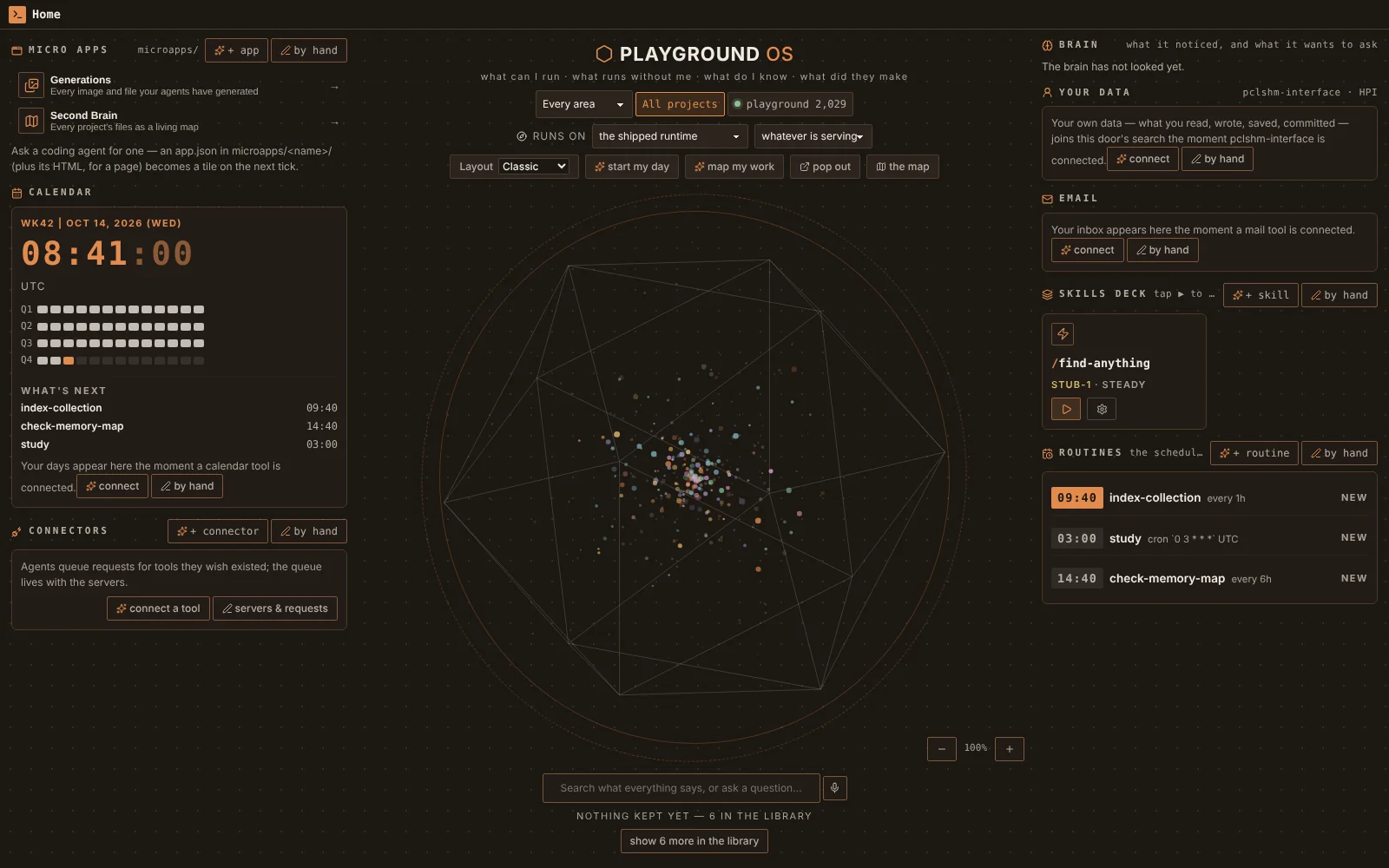
A node's front door — the deck, the routines board, what's next, served by pg brain serve --locked to a browser. screenshot · 0.1.0 · Linux · served to a browser
03 Locked, for a node nobody watches
Its agents may read, edit their workspace and coordinate. Nothing else.
pg brain serve --locked arms one profile for the whole process, before anything can call a tool. A call passes only when the shipped policy allows it without asking anyone. Everything else is denied at once, with the profile named in the refusal and in the run's audit — nothing waits five minutes for an approval nobody can give.
It may not run a program, publish, reach an endpoint its arguments name, delete a record, or use a tool another server provides; a third-party MCP server is not even started. Only a runtime that declares it can work locked runs: the in-house reference loop, and Claude Code launched --restricted with five tools — Read, Edit, Write, Glob, Grep — reaching its model through the gateway with a grant scoped to its run. The model key is read from a root-owned file and taken out of the process's environment at boot, so no child inherits it. A person's own auto policy does not reach a locked node: it was written with somebody watching.
the locked unit, and what the serve says at startsystemd · output
ExecStart=/usr/local/bin/pg brain serve --port 7317 --locked --token-file %d/surface-token
serving the front door on http://127.0.0.1:7317 (loopback only, token on every call)
…
the locked profile (--locked): an unattended agent may read, edit its workspace and
coordinate its own work; it may not run a program, publish, reach an endpoint it names,
delete a record, or use a tool another server provides. Every other call is denied at
once — nothing waits for an approval — and only a runtime that declares
`session.locked` runs.
…
MCP servers: none is switched on
04 A VPS, on demand new
One command brings a locked node up. One takes it down.
From a checkout of the repository: just vps deploy on Linux or WSL, or Actions → VPS → Run workflow on GitHub. Both run the same driver and the same Terraform, so a node made from your desk can be destroyed from GitHub, and the other way round.
01
Buildpg and the front door, as a release build. The first one is the long part: about fifteen minutes on four cores.
02
ProvisionTerraform makes an Ubuntu 24.04 server — a cx23, 2 vCPU and 4 GB, in Nuremberg unless you choose otherwise — and a firewall that lets in SSH and nothing else. It generates the deploy key, the server's SSH host key and the surface token.
03
First bootcloud-init makes a key-only deploy login with root and passwords off, pins the host key, adds swap and turns on security upgrades.
04
InstallOver SSH with the host key pinned from the state — nothing “accepted on first use”: pg, the front door, Claude Code checked against the hash npm publishes for it, the token file, your API key in a root-only 0600 file, and the locked service exactly as the repository has it.
05
Health checkIt ends by asking the front door twice, without the token and with it: 401 without the token, 200 with it, or the deploy fails and prints the service's journal.
A redeploy installs the new build over the old one and keeps the home. A deploy refuses any plan that would delete or replace the server — a new location would, and the home would go with it — so a plain redeploy never resizes, moves or renames anything. The cost is the server: about €6 a month for a cx23, billed by the hour up to that, so a node you destroy after an afternoon costs cents.
from a checkout · Linux or WSLsh
$ export HCLOUD_TOKEN=… ANTHROPIC_API_KEY=…
$ just vps plan # what deploy would change$ just vps deploy # build, provision, install, health checkthe front door answers on 127.0.0.1:7317: 401 without the token, 200 with it$ just vps status # where it is; the health check again$ just vps tunnel # the front door on http://127.0.0.1:7318$ just vps ssh # a shell on the node$ just vps destroy --yes # delete the server and its home
On GitHub the Terraform state lives in an S3-compatible bucket you name — Cloudflare R2's free tier is enough — and a runner refuses to run without one: its disk is gone when the job ends, and a dispatch that forgot the server could neither update it nor destroy it. The workflow's destroy wants the node's name typed in, not just a dropdown left on the wrong choice. The token, the shell and the tunnel are refused on a runner; those run on your machine, against the same state.
05 Reach it from your desk
A tunnel is the transport. The token is the identity.
The node listens on its own loopback and nowhere else, so seeing it from your laptop is a tunnel to that loopback. The choice is about your network, not about this app.
SSH:ssh -N -L 7318:127.0.0.1:7317 user@node, then http://127.0.0.1:7318. On the VPS, just vps tunnel does exactly this and prints the URL with the token.
A Tailscale or WireGuard mesh: serve the node's loopback on the mesh and open its mesh name.
A VPC with a bastion: the same -L, through the bastion.
A reverse proxy you trust: only with TLS and client certificates — never in the clear on a network you do not own.
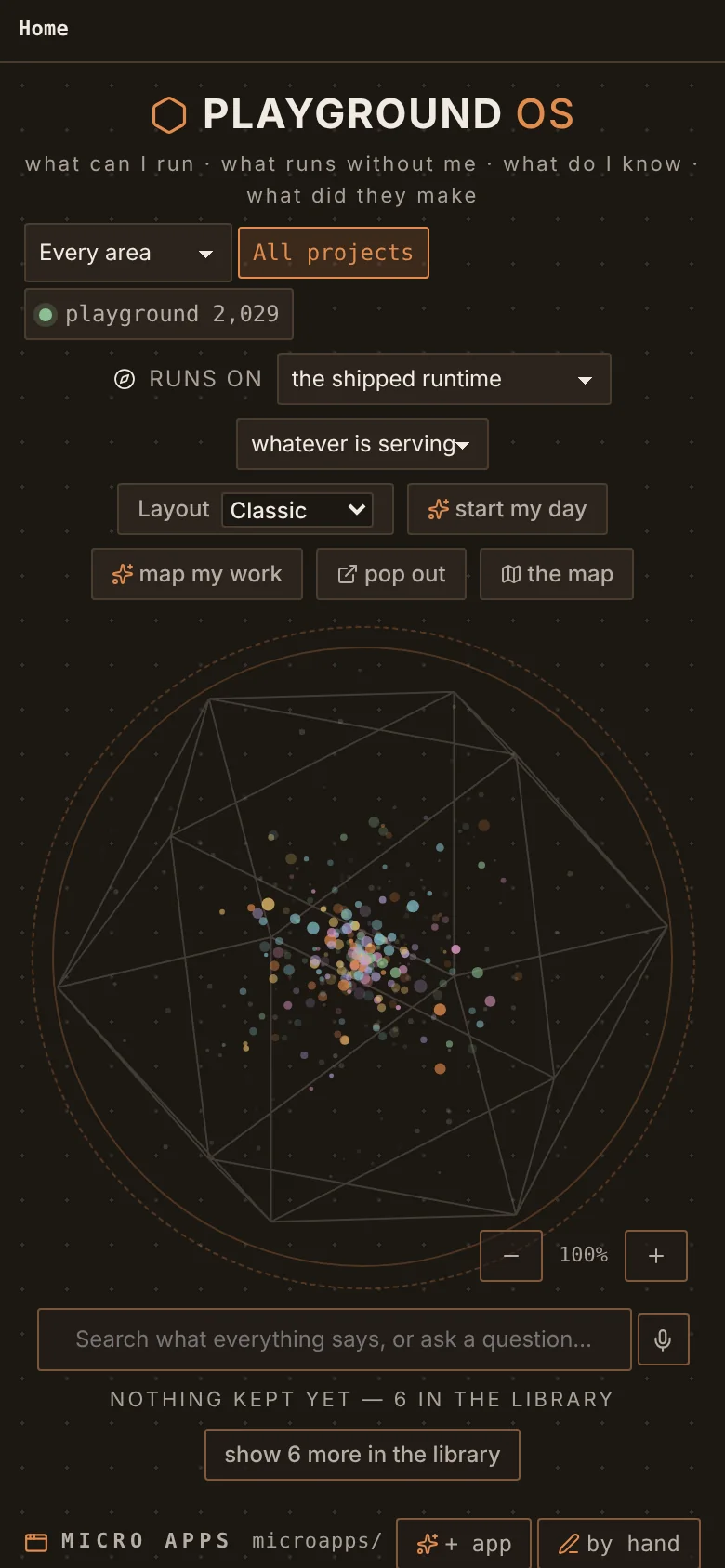
Open the URL with ?token=… once and the page keeps it. That is the whole front door — the wheel, the deck, the routines board, the map — and a card pressed there starts a run on the node. A dropped tunnel leaves the node serving; the next caller is answered.
The same door, at phone widthscreenshot · 0.1.0 · Linux · 390px
06 Manage it, and several
Your own install keeps a list of nodes.
A name, the tunnel's near end, and which keychain entry holds that node's token — the rows carry no secret. pg nodes speaks exactly the bridge a browser tab speaks: the same allow-list, the same refusals, in the node's own words.
Adding a node asks it which install it is and pins that identity, so an address that later answers as another install is refused. probe times the cheapest read on each; fleet is what every node's agents are doing right now; call reaches any declared read, and the three acts. There is no second protocol and no remote approval: what a node's owner let a token holder do is what you can do. The output below is real, shortened where it says …: a second home talking to a locked node on the same Linux machine, its address written as the tunnel's.
your desk → the nodesh
$ just vps token | pg nodes add playground-node --url http://127.0.0.1:7318
pinned as `vm` (01M4WRTF…DP6B): `pg tasks assign <task> --node playground-node` binds a routine to it$ pg nodes probe
playground-node up 21 ms project: playground$ pg nodes call playground-node deck_press --args '{"selector":"find-anything"}'
{ "status": { "type": "Queued" }, … }$ pg nodes fleet
== playground-node (http://127.0.0.1:7318)
find-anything succeeded 01M4WS72…P92R
study succeeded 01M4WRVJ…CSS
07 A routine on the node
Bind a routine to the node, and it runs there with your laptop shut.
A routine is bound to the one node it runs on. Every other install holding a copy then leaves its slots alone and refuses a fire of it by name, so a slot never runs twice.
Press Fire on your desk and the request is delivered to the node; the run is the node's, and the request here says so. A node that does not answer leaves the request queued and retried on every tick until its time runs out, or gives up at once if you said so. A cap — so many a UTC day, so many in any window — is written on the binding, and every ask counts against it: the schedule, Fire, an agent, the bridge, another node. A slot missed while the node was down is asked for once when it wakes, never replayed for every hour it slept.
your desksh
$ pg tasks assign study --node playground-node --offline queue:6h
$ pg tasks limit study --per-day 4$ pg triggers requests # who asked, for which slot, and what came of it
08 The central record
Work done on your desk, offline or not, reaches the node once.
The node can keep the central record: the install you make central by issuing credentials from it. Your laptop enrols one project at a time, from a preview that names everything it would record and everything it leaves out — and nothing is enrolled until you enrol it.
What travels is every write of a run's document and every run event, and every change in the project's tree — path, kind, who made it, digest and size. Never recorded, not even by name: your excluded folders, files that commonly hold a secret (.env, keys, certificate stores), databases, caches, version control's and the app's own stores, temporary files. Credentials, provider sign-ins and approval grants are in no record at all. Each delivery pass is itself a run, every minute while the app runs and something waits; nothing is deleted on your desk before the central record acknowledges it, and a lost reply costs a resend, never a second row.
on the node, then on your desksh
# on the node: a credential for your laptop, for one project$ pg sync grant --node <node-id> --project <project-id> --label laptop
# on your desk$ pg sync preview Papers --exclude private
$ pg sync enrol Papers --exclude private --preview <digest>
$ pg sync connect http://127.0.0.1:7318 # the credential on stdin$ pg sync status
# on the node: both streams, each record once, each with the node that sent it$ pg sync history <project-id>
09 Take it down, and security in one place
Destroying the node deletes its home. Say so twice.
just vps destroy --yes from your desk, or the workflow's destroy with the node's name typed in. Moving a node to another location is a destroy, then a deploy.
Ports: SSH only — key-only, no root, no passwords — and ping. SSH is open to every address by default because GitHub's runners have none fixed; deploying only from your desk, narrow it to your own address.
Keys: the host key is pinned from the state for each command; the deploy key lives in a temporary folder removed on exit. Your API key goes from your environment to its root-only file over SSH — never an argument, a log line, the Terraform state or the build folder.
The token: in a file systemd hands the service. deploy --rotate-token issues a new one and the old one stops working.
Exact pins: Terraform, its providers and Claude Code, each at one version, checked before it is installed.
Updates: Ubuntu's unattended security upgrades are on; a redeploy installs the current build and keeps the home.
10 Start on your desk
Every node starts as an install on your desk.
Playground is not released and no release is planned, so that install is a build from a checkout of the source. The packaging makes three installers with pg beside the app; the .deb and .rpm put pg in /usr/bin, which is all a Linux node needs.